
Crew fringes are live: add on-costs on top of a base day rate
Build loaded crew rates with percentage-based on-cost lines like National Insurance, pension, and holiday pay, then carry those totals through reports and exports.
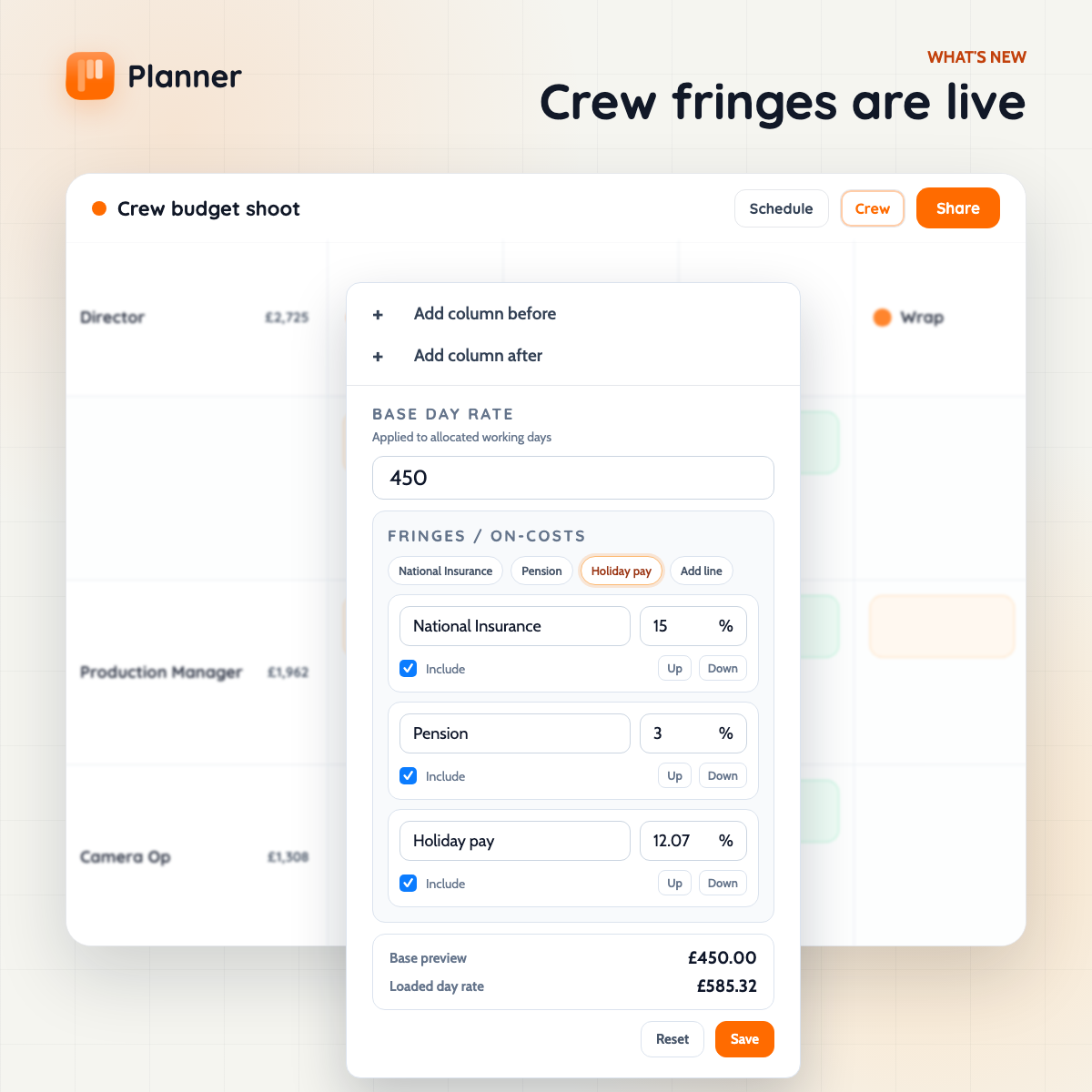
Crew fringes are live
Budgeting crew often starts with one simple number: the base day rate.
But that is rarely the full cost.
Production budgets usually need the loaded rate too - the base rate plus employer on-costs like National Insurance, pension, holiday pay, or any other standard percentage-based fringe line the production wants to track.
Planner now supports that directly in crew.
What ships in this release
- Set a Base day rate for each crew member.
- Add optional fringe or on-cost lines underneath it.
- Use percentage-based lines such as National Insurance, Pension, and Holiday pay.
- Toggle fringe lines on or off without deleting them.
- See a live Loaded day rate preview while editing.
- Carry loaded totals through the crew planner, report panel, and finance exports.
Why this matters
Crew budgeting usually is not just “rate times days”.
Teams still need the clean base rate for comparison and negotiation, but the production cost usually lives in the loaded number. Before this, that meant mental maths, side spreadsheets, or notes outside the schedule.
Now the same crew record can hold both:
- the base day rate
- the extra percentage lines that sit on top of it
- the resulting loaded cost
That gives production teams a cleaner handoff between scheduling and budgeting without turning the schedule into a payroll tool.
Built for budgeting, not payroll compliance
This release is intentionally simple.
Fringes are manual percentage lines applied to the base day rate. They do not attempt to model payroll thresholds, jurisdiction rules, or statutory edge cases.
That makes the feature useful for budgeting conversations straight away while keeping the interaction fast and predictable.
Where you see it
The new loaded-rate model now carries across the places teams actually use it:
- the crew rate editor in the grid
- live crew totals in the planner
- the report panel finance view
- finance-ready exports
So if someone adds a fringe line to a crew member, the cost picture updates in the places that matter instead of getting trapped in one menu.
Better visibility without hiding the base rate
The point of fringes is not to replace the base day rate.
It is to keep the base rate visible, then make the extra production costs explicit underneath it. That makes budgets easier to read and easier to explain - especially when a loaded rate needs to be reviewed by someone who wants to see what is actually driving the total.
Built for the way staffing budgets are usually presented
This update came from a very practical budgeting pattern:
start with the core rate, then add the extra employer costs as separate percentage lines.
Planner now matches that structure much more closely, so the schedule and the budget conversation do not have to drift apart.